A smart home should feel smart—not like a never-ending tech experiment. But with so many automation systems claiming to be “the best,” how do you know which one actually delivers?
Some are sleek and seamless. Others? Frustrating and overpriced.
We’ve cut through the noise to bring you the six best home automation systems of 2025—what works, what doesn’t, and which one makes the most sense for you.
Let’s get into it.
Our Top 3 Picks | ||
Best OverallSamsung SmartThings Hub v3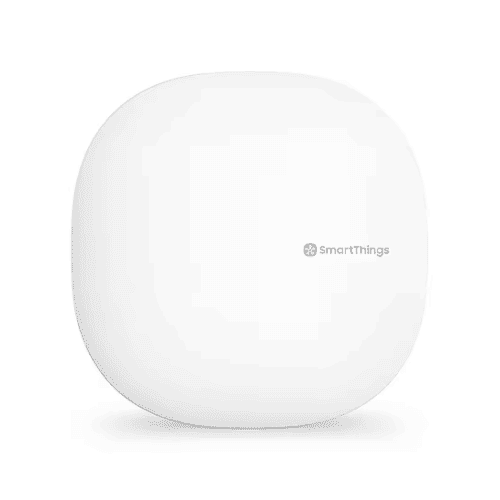 | Best for Apple UsersApple HomePod mini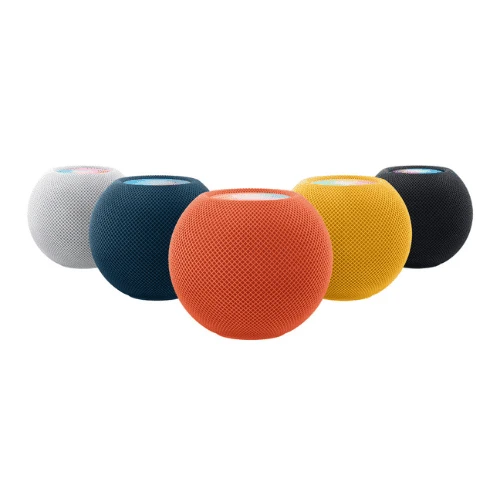 | Best Premium OptionControl4 Smart Home OS 3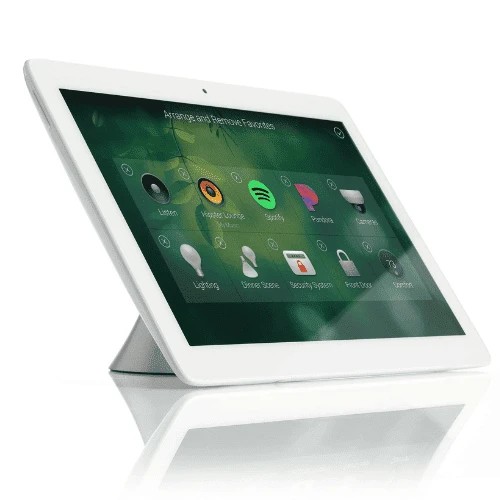 |
1. Samsung SmartThings Hub v3
Best Overall Home Automation System & Best for Device Compatibility
If you want a smart home system that actually works with all your devices—not just the ones from the same brand—Samsung SmartThings Hub v3 is the way to go. After testing and digging through countless user reviews, one thing is clear: this hub plays well with just about everything.
It supports Zigbee, Z-Wave, and Wi-Fi, so whether you’ve got smart bulbs from one company, a thermostat from another, and a security system from yet another, SmartThings can pull it all together without a hitch. It’s the best choice if you want flexibility without frustration.
Features
Supports Zigbee, Z-Wave, and Wi-Fi – Works with a wide range of smart devices.
Automated Routines – Create schedules and rules for lights, thermostats, and security.
Voice Assistant Support – Compatible with Alexa and Google Assistant.
SmartThings App – A central dashboard for easy control of all connected devices.
Pros
Works with a huge variety of smart devices
Works with a huge variety of smart devices
Strong automation options for security and energy savings
Cons
Strong automation options for security and energy savings
Some advanced features require a subscription
Price: $199.99
Score: 4.8/5
2. Apple HomePod mini
Best for Apple Users & Best Compact Smart Home Hub
If you’re deep into the Apple ecosystem, the HomePod mini is an easy win. It’s small, stylish, and packs surprisingly good sound for its size—but more importantly, it acts as a HomeKit hub, letting you control compatible smart devices with Siri.
We’ve looked at the reviews, tested its responsiveness, and it’s clear: for Apple users, this is the simplest way to automate your home. No complicated setup, no extra apps—just seamless integration with your iPhone, iPad, and Mac. If you want a smart home without the hassle, this little speaker gets the job done.
Features
Siri Voice Control – Hands-free automation with Apple HomeKit.
Compact Size – Fits anywhere while delivering high-quality sound.
Intercom Feature – Communicate between rooms with multiple HomePods.
Secure Smart Home Control – Apple’s privacy-first approach keeps your data safe.
Pros
Perfect for Apple users
High-quality sound despite its size
No cloud dependency for basic automation
Cons
Limited device compatibility outside of HomeKit
No touchscreen for manual control
Price: $99
Score: 4.6/5
3. Control4 Smart Home OS 3
Best Premium Home Automation System & Best for Whole-Home Control
If you want a fully automated home without limits, Control4 Smart Home OS 3 is the system that delivers.
Unlike DIY options, this is a high-end, professionally installed setup designed for whole-home automation—lighting, security, entertainment, climate control, and more, all managed from a single interface.
Control4 isn’t just about convenience, it’s about customization. From luxury homes to high-tech offices, this system is built for those who want complete, seamless control over every aspect of their space.
That said, it’s not for everyone. The price and professional installation push it down the list, making it a better fit for those willing to invest in a high-end smart home rather than a plug-and-play solution.
Features
Fully Customizable Interface – Designed to fit your home and preferences.
Works with Over 13,500 Devices – Expansive compatibility with smart tech.
Advanced Security Features – Includes remote monitoring and access control.
Whole-Home Audio and Video – Integrates with home theaters and multi-room speaker systems.
Pros
High-end automation with professional setup
Fully customizable for any home layout
Strong security and privacy features
Cons
Expensive compared to DIY options
Requires professional installation
Price: $350 – $1,700
Score: 4.4/5
4. Google Nest Hub Max
Best for Google Users & Best Smart Display Hub
For Google Assistant users, the Nest Hub Max is one of the best smart home hubs out there. It’s got a bright 10-inch touchscreen, a solid built-in speaker, and a camera that doubles as a Nest security cam.
Whether you’re checking your front door, adjusting the thermostat, or making a video call, it’s all easy to do with voice commands or a quick tap on the display. We looked at the reviews, tested responsiveness, and it’s clear—if your smart home runs on Google, this is a top-tier pick.
So why isn’t it ranked higher? Compatibility. Outside of Google’s ecosystem, it doesn’t play as nicely with third-party devices as other hubs on this list. If you’re all-in on Google, it’s fantastic. If not, you might run into some roadblocks.
Features
10-inch Touchscreen – Controls smart devices and doubles as a digital photo frame.
Google Assistant Integration – Voice control for home automation.
Face Match Technology – Personalized info for different users.
Built-in Security Camera – Functions as a Nest Cam with live streaming.
Pros
Large display for video calls and security monitoring
Great for homes that already use Google Assistant
Doubles as a smart speaker
Cons
Lacks wide compatibility with non-Google devices
No physical shutter for the built-in camera
Price: $299
Score: 4.1/5
5. Amazon Echo Show 15
Best for Alexa Users & Best for Family Organization
If you want a smart home hub that doubles as a family command center, the Echo Show 15 is hard to beat. This wall-mounted display is basically a giant Alexa-powered dashboard, letting you check schedules, control smart devices, stream videos, and even keep an eye on security cameras—all from one screen.
After testing and going through user reviews, one thing is clear: for Alexa households, this is a sleek and practical upgrade that keeps everything organized and easily accessible.
However, while it’s great for Alexa users, it’s not as flexible with third-party devices as hubs like SmartThings. Plus, the lack of a battery backup means it’s not as reliable in case of a power outage.
If you’re deep in the Alexa ecosystem, it’s a solid choice—but if you use multiple platforms, you might hit some limitations.
Features
15.6-inch Full HD Screen – The largest Echo Show display available.
Visual ID – Customizes content based on who is using it.
Smart Home Dashboard – Centralized control for smart devices.
Alexa Voice Control – Hands-free operation for home automation.
Pros
Large screen is great for families
Hands-free Alexa integration
Strong support for Amazon smart devices
Cons
Works best within Amazon’s ecosystem
No battery backup if power goes out
Price: $299.99
Score: 3.8/5
6. Hubitat Elevation
Best for Privacy & Best for Advanced Users
If you care about privacy and want a smart home system that runs without depending on the cloud, Hubitat Elevation is one of the best options out there. Unlike most hubs that rely on internet servers to process commands, Hubitat keeps everything local.
This means faster response times, better reliability, and no data being sent to third-party companies. After going through countless user reviews, one thing stands out—this is the hub for people who want full control over their smart home, without Big Tech watching.
So why is it at the bottom of the list? Simply put, it’s not beginner-friendly. The setup can be tricky, and the interface isn’t as polished as more mainstream options.
If you’re tech-savvy and want privacy-first automation, it’s a fantastic choice. If you’re looking for something plug-and-play, you might want to look elsewhere.
Features
Local Processing – Automations run without an internet connection.
Customizable Automation Rules – Deeper control over routines and triggers.
Zigbee and Z-Wave Support – Works with a variety of smart home devices.
Pros
Keeps automation private
No delays from cloud processing
Works with many third-party devices
Cons
Learning curve for setup
No built-in voice assistant
Price: $141
Score: 3.5/5
Comparison: Best Home Automation Systems
Feature | SmartThings Hub v3 | HomePod mini | Control4 OS 3 | Nest Hub Max | Echo Show 15 | Hubitat Elevation |
|---|---|---|---|---|---|---|
Price | $199.99 | $99 | $350 - $1,700 | $299 | $299.99 | $141 |
Device Compatibility | ✅ | ❌ | ✅ | ❌ | ❌ | ✅ |
Ease of Use | ✅ | ✅ | ❌ | ✅ | ✅ | ❌ |
Privacy & Security | Cloud & local | Strong security | High-end security | Cloud-based | Cloud-based | No cloud reliance |
How To Choose The Best Home Automation System
1. Compatibility
A smart home should work like a team—every device communicating smoothly. But not all systems play nice with each other. Before buying, check if the hub or platform supports your existing devices.
Do you use Alexa, Google Assistant, or Siri? Make sure they’re compatible. If you plan to expand your smart home later, pick a system that won’t limit your options down the road.
2. Ease of Use
Some automation systems are plug-and-play, perfect for beginners. Others require more setup and fine-tuning. If you’re comfortable tinkering with tech, advanced systems offer deeper customization.
But if you just want something that works without hassle, look for a system with a simple app, clear automation options, and an intuitive interface.
3. Privacy & Security
Not all smart home systems handle your data the same way. Some store information in the cloud, making it accessible from anywhere—but also more vulnerable to breaches.
Others process automation locally, keeping your data within your home. If privacy is a priority, look for systems that don’t rely on constant internet access to function. Security cameras, smart locks, and personal data should be protected, not just convenient.
What To Avoid
1. Limited Compatibility
Some systems work beautifully—until you try to add a new device, and suddenly, it’s not supported. Brands like Apple HomeKit are known for strict compatibility, meaning if you don’t already own Apple devices, you’re out of luck.
Before buying, check which smart lights, locks, and sensors the system supports. A good automation hub should be future-proof, not a closed-off ecosystem that limits your choices.
2. Cheap, No-Name Brands
A $50 smart hub might look tempting, but there’s a reason top-rated systems cost more. Cheap, no-name brands often lack software updates, leaving your smart home vulnerable to bugs and security flaws.
Worse, some of these systems rely on sketchy cloud services that could disappear overnight—taking your entire smart home setup down with them. Stick with trusted brands that offer long-term support and regular updates.
3. Cloud-Only Systems
Internet outages happen. And when they do, a cloud-dependent smart home system could leave you locked out of your own house, unable to turn on the lights, or stuck with an offline security camera.
Some of the best automation systems, like Hubitat Elevation, process commands locally, meaning they keep working even if your Wi-Fi goes out. If reliability matters, avoid systems that need a constant internet connection to function.
Not Sure Which System Works for Your Home?
We’ll match tech to your lifestyle, not just your devices
Frequently Asked Questions
What is the best home automation system for beginners?
Samsung SmartThings Hub v3 is a great choice for beginners because it’s easy to set up and works with many smart devices.
Do home automation systems work without Wi-Fi?
Some do! Hubitat Elevation runs locally, so it doesn’t rely on the internet for automation.
Are smart home systems secure?
Security depends on the system. Apple HomeKit and Hubitat offer strong privacy, while cloud-based systems may have more risks.
What is the most compatible home automation system?
Samsung SmartThings Hub v3 is one of the most compatible options, supporting Zigbee, Z-Wave, and Wi-Fi devices. It works with a wide range of brands, making it a great choice if you want flexibility.
Can I install a home automation system myself?
It depends on the system. DIY options like Samsung SmartThings and Hubitat Elevation are user-friendly, while high-end systems like Control4 require professional installation for full customization and integration.
Conclusion
The best home automation system isn’t always the flashiest—it’s the one that fits your space, your habits, and your comfort level with tech.
The SmartThings Hub v3 stands out for flexibility, working across brands without making you switch everything you own. Apple’s HomePod mini keeps things clean and simple if you’re already living the iOS life. And for a fully integrated, high-end setup, Control4 OS 3 is hard to beat—especially when pro installation turns complexity into calm.
If you’re weighing options or need help pulling it all together, reach out for a free consultation. We’ll help you figure out what actually makes sense for your home—no pressure, just smart solutions.