Systems & Cameras
Analog vs IP Security Cameras: Complete Guide for Commercial Properties
Jun 30, 2026

Two architectures. Completely different infrastructure requirements, cost profiles, and capability ceilings.
The analog vs IP security cameras question gets asked at the start of almost every commercial surveillance project (and the answer isn't the same twice).
Building type, existing cabling, operational requirements, budget horizon: they all pull the decision in different directions. Here's everything you need to work through it.
Key Notes
IP cameras deliver 4–12+ MP resolution; HD-analog tops out significantly lower.
Hybrid systems let properties phase an IP migration without replacing working coax.
Long-term TCO favors IP; HD-analog often requires full re-platforming within a decade.
Analog vs IP Security Cameras: How Each System Works
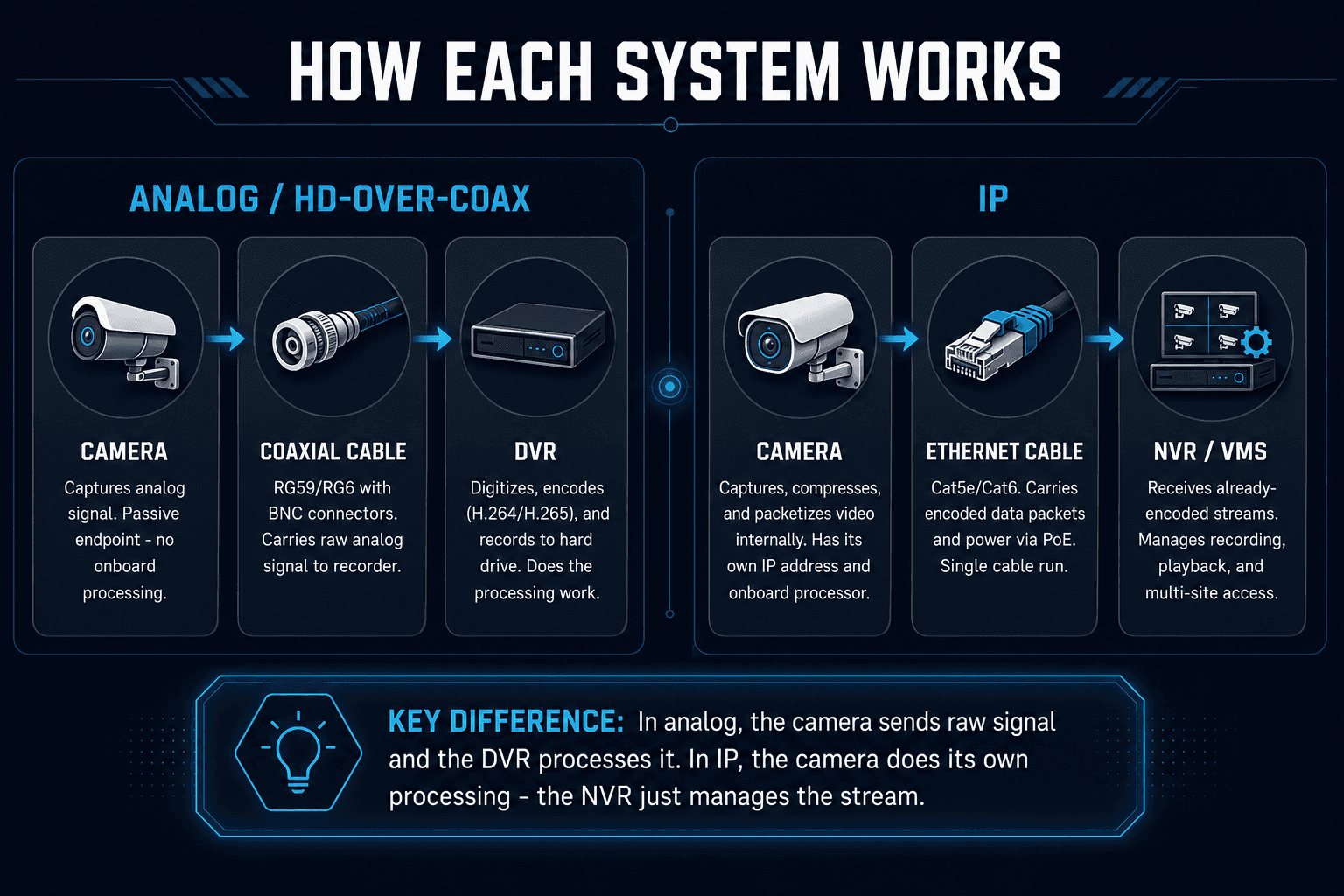
The core difference between analog and IP security cameras is where the video gets processed – and that single difference shapes everything else about the system.
A Note On HD-Analog:
Traditional CCTV analog was standard-definition, measured in TV lines.
Modern HD-over-coax formats (AHD, TVI, CVI) push 720p to 4K over the same coax infrastructure.
Many HD-analog DVRs are hybrid, supporting both legacy SD cameras and newer HD-analog units on the same recorder. This matters because when people talk about "analog" today, they usually mean HD-over-coax (not the old composite video systems).
Analog vs IP Security Cameras: Image Quality & Coverage
On image quality, IP wins. And the gap is meaningful in commercial environments where footage needs to hold up under scrutiny.
Factor | IP | HD-Analog |
Typical resolution | 4–12+ MP, wide range | Up to ~4K (limited models) |
Digital zoom quality | Retains usable detail | Degrades quickly |
Low-light performance | WDR and multi-exposure on mid-range models | Adequate for basic use |
Field of view options | Panoramic, multi-sensor, fisheye available | Single-sensor, fixed |
Frame rate | 25/30 fps standard | 25/30 fps standard |
Resolution Is Where The Difference Is Most Pronounced
IP cameras routinely deliver 4–12+ MP, with 4K models now standard across mid-range product lines.
HD-analog tops out lower and offers fewer options at the higher end of the resolution range.
For identifying faces at building entrances, reading license plates at loading docks, or covering large warehouse floors with fewer cameras, the pixel density advantage of IP systems is real and consistent.
Digital Zoom On Recorded Footage…
Is a practical test that exposes the gap clearly.
When you zoom into a recorded IP frame to identify someone, detail holds.
On analog footage, the same zoom produces smearing and blocking – the signal simply doesn't carry enough information to support it.
Low-Light Is Less Clear-Cut
Both technologies use IR LEDs and similar sensors – a good HD-analog camera handles a basic parking lot or corridor without issue.
Where IP pulls ahead is in complex lighting conditions:
lobbies with backlit glass
loading docks with overhead lights and dark zones
mixed-exposure scenes
Mid-range IP cameras with wide dynamic range and multi-exposure processing handle these situations noticeably better.
Coverage Per Camera Is Worth Factoring Into The Cost Comparison
Multi-sensor and panoramic IP cameras can cover 180°–360° from a single mount point.
In environments where cabling runs are constrained or camera counts are limited by budget, one wide-area IP camera can replace several fixed analog units.
Analog vs IP Security Cameras: Infrastructure, Installation & Scalability
This is where the choice is made for most commercial projects.
Factor | HD-Analog | IP |
Cabling | Coax (RG59/RG6) with BNC connectors | Cat5e/Cat6 with RJ45 |
Topology | Home-run – every camera runs dedicated coax back to DVR | Switched Ethernet – cameras connect to local switches, switches uplink to NVR |
Power delivery | Separate power run per camera | PoE – single cable carries power and data |
Scalability | Adding cameras means pulling new coax back to the recorder | Adding cameras is a network expansion, not a rewiring project |
Distance flexibility | Practical limits without signal amplifiers | Extends with additional switches or fiber |
Existing infrastructure advantage | Reuse coax already in walls – faster and cheaper than re-cabling | Leverages existing network infrastructure where present |
IT overhead | Minimal – self-contained, no network management required | Requires switches, VLANs, firewall rules, and ongoing cybersecurity management |
Analog vs IP Security Cameras: Analytics, Integration & Remote Management
The difference between analog and IP security camera systems is most dramatic here (and for commercial properties with compliance requirements or operational complexity, it's often the deciding factor).
Analytics
IP cameras are intelligent endpoints, not passive recording devices. The analytics capabilities available on an IP security camera system have no real analog equivalent:
License plate recognition (LPR): Reliable identification at vehicle entrances and loading docks.
Facial recognition and people counting: Access validation, occupancy monitoring, incident review.
Heat mapping and dwell analysis: Useful in retail, hospitality, and high-traffic commercial environments.
Smart motion detection: Event-based recording triggered by defined object types, not pixel changes.
Platform Management: VMS vs DVR
A DVR is a recorder. A Video Management System (VMS) is a platform.
Multi-site visibility: Manage cameras across multiple properties from a single interface.
Role-based access and audit trails: Essential for compliance-driven industries – healthcare, finance, institutional facilities.
System integrations: API-level connections to access control, intercoms, and building management systems.
Remote Management
Most networked DVRs support remote viewing via app or browser – functional, but limited.
Central configuration, enterprise oversight, and multi-user management are IP-native capabilities. For properties that need to manage security across sites or report on system activity, analog's remote access falls well short.
Analog vs IP Security Cameras Cost: Upfront & Long-Term
Analog is cheaper to start. IP is usually cheaper to own over time.
Cost Factor | HD-Analog | IP |
Hardware (cameras + recorder) | Lower – bundles cost less than equivalent IP hardware | Higher upfront camera and NVR/VMS cost |
Cabling (new install) | Lower – coax is inexpensive to run | Higher if Cat5e/Cat6 needs to be pulled throughout |
Cabling (existing infrastructure) | Minimal – reuse coax already in walls | Competitive if network infrastructure already exists |
Storage | H.264/H.265 support – comparable at system level | Event-driven and AI-triggered recording reduces stored footage at scale |
Upgrade path | Limited – architecture has a ceiling; better cameras help but don't change the platform | Incremental – swap cameras, add analytics licenses, extend to new sites without replacing infrastructure |
7–10 year TCO | Re-platforming likely as requirements grow | Avoids full rip-and-replace; TCO advantage materializes over time |
The Long-Term Case For IP Comes Down To Re-Platforming Cycles
On a 50+ camera installation, smarter recording alone reduces storage costs meaningfully – and over a 7–10 year window, the ability to upgrade incrementally rather than replace entirely is where the TCO gap opens up.
Hybrid Systems: Bridging The Gap
For properties with existing analog infrastructure, a full IP migration isn't always the right first step. A hybrid approach – running analog and IP cameras on the same recorder – is a widely used transition strategy.
When Hybrid Makes Sense:
Working coax that isn't worth replacing. Keep legacy analog cameras on standard recording duties, add IP at high-value locations (main entrances, server rooms, loading docks).
Phased budget migration. Spread CapEx across budget cycles rather than a single large capital outlay.
Operational continuity. Avoid system downtime during a staged cutover
The Typical Upgrade Pattern Starts With The Recorder:
Replace the old DVR with a hybrid unit that accepts both BNC (analog) and IP channels.
From there, add IP cameras at priority zones first.
Over time, swap out remaining analog cameras as budget and operational windows allow.
Hybrid Has Real Limitations
IP channel caps: Many hybrid recorders support a modest number of IP channels (often 8–24), which can bottleneck the migration before it's complete.
Feature disparity: Advanced VMS analytics may not be fully accessible through a low-end hybrid DVR; you get recorder-level features, not enterprise platform capability.
Two infrastructures to manage: Coax and Ethernet running in parallel, different resolutions, different feature sets, one UI trying to hold it together
Hybrid is a bridge, not a destination.
It works well as a migration strategy, but it gets complicated if it becomes the permanent state.
Which System Is Right For Your Property?
It depends on the building, the infrastructure, and what the system needs to do.
Scenario | Recommendation |
New commercial build | IP – design PoE and structured cabling from day one |
Existing property with working coax | HD-analog or hybrid – leverage the infrastructure |
Enterprise / multi-site portfolio | IP – VMS, central management, audit trails |
High-security zones needing analytics | IP – LPR, facial recognition, smart search |
Budget-constrained, basic recording | HD-analog – simpler, lower upfront cost |
Long-term investment (7–10 years) | IP – avoids re-platforming, scales with the property |
Compliance-driven industry | IP – VMS audit trails, secure transmission, role-based access |
Not Sure Which Architecture Your Property Needs?
We assess your site and design the right system.
Analog vs IP Security Cameras FAQs
Can you use IP cameras with an existing analog DVR?
IP cameras are not directly compatible with an analog DVR – a DVR is designed to receive analog signals over coax, not encoded network streams. To mix both camera types on one system, you need a hybrid recorder with both BNC and IP channel inputs.
What is the difference between an NVR and a DVR?
The difference between an NVR and a DVR comes down to where video encoding happens. A DVR receives raw analog signals from cameras and encodes them itself; an NVR receives video that's already been encoded by the IP camera, and focuses on stream management, recording, and playback.
Do IP cameras work without internet?
IP cameras don't require an internet connection to record – they operate over a local area network (LAN), sending footage directly to an NVR on the same network. Internet access is only needed for remote viewing, cloud storage, or off-site management.
How far can an IP camera be from the NVR?
The standard Ethernet limit for an IP camera run is 328 feet (100 meters) per cable segment. Beyond that distance, network switches or fiber optic cabling extend the reach – making IP systems far more flexible than analog for large campuses, multi-floor buildings, or properties with widely distributed camera locations.
Conclusion
IP wins on resolution, analytics, scalability, and long-term TCO. HD-analog wins on upfront cost and simplicity – and holds its ground anywhere working coax infrastructure makes a full re-cable hard to justify.
The analog vs IP security cameras debate doesn't have a universal answer because properties aren't universal: a new commercial build and a 1990s warehouse retrofit are different problems with different right answers.
What the spec sheets don't account for is existing infrastructure, operational requirements, IT capability, and where the building needs to be in seven years. Get those factors wrong and the cheaper option up front becomes the expensive one at year four.
Highline assesses the site, designs around what's there, and builds integrated systems that don't need to be replaced on a short cycle. Book your free consultation!