You’d think a door buzzer system would be a simple thing.
But once you start looking, there’s a surprising number of options – and even more opinions. Wired, wireless, video, app-controlled… it adds up fast.
We’ll lay it out clearly: what the different systems do, how much they cost, what setup involves, and how to make the right call for your space.
Key Notes
Choose between audio-only, video, wireless, or smart systems based on security needs.
Wireless systems cost $350-$1,100 while wired systems range from $450-$1,900 installed.
DIY wireless setups work for homes, professional installation recommended for commercial properties.
Wired systems last 10-15 years versus 5-8 years for wireless options.
What Is a Door Buzzer System?
A door buzzer system is an access control system that allows you to grant or deny entry to visitors from a remote location.
When someone presses the buzzer at your building entrance, the system alerts the inside occupant – via a receiver, intercom, or smartphone – and the door can be unlocked remotely with the press of a button.
Door buzzer systems typically consist of:
An exterior call station (buzzer panel)
Interior receiver(s) with an unlock function
Electric door strike or maglock
Optional features: video cameras, keypads, RFID card readers, or app control
Why Use a Door Buzzer System?
Security: You control who enters your property.
Convenience: Let in deliveries, guests, or staff without walking to the door.
Monitoring: Many systems log access or provide video footage.
Compliance: Commercial properties often require controlled entry points.
Types of Door Buzzer Systems
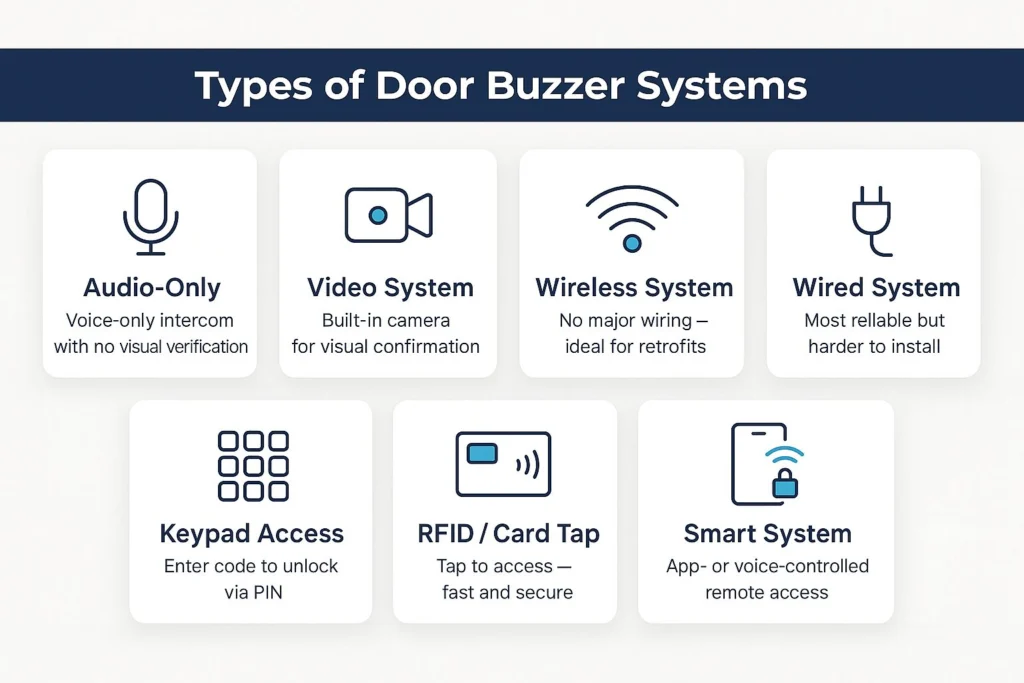
1. Audio-Only Door Buzzer Systems
Basic intercoms that allow two-way voice communication
No video feed or visual verification
Common in older apartment buildings
2. Video Door Buzzer Entry Systems
Includes a built-in camera
Lets tenants verify identity visually before granting access
Often paired with cloud recording and mobile access
3. Wireless Door Buzzer Entry Systems
Communicate over Wi-Fi, cellular, or radio frequencies
No major wiring required
Suitable for retrofits or locations with limited infrastructure
4. Wired Door Buzzer Systems
Hardwired connections between all components
More reliable but expensive and invasive to install
Better for new builds or long-term installations
5. Keypad or PIN-Based Buzz-In Systems
Grant access via shared codes or unique PINs
Often integrated with visitor scheduling or delivery workflows
6. RFID or Card-Based Buzzer Systems
Require employees or tenants to tap an ID card or fob
May be combined with intercom or camera for added control
7. Smart Door Buzzer Systems
App-controlled via smartphone
Includes video, notifications, and cloud-based logs
Can be integrated with Alexa, Google Assistant, or smart locks
Wired vs Wireless: What’s Right for You?
Wired Systems
Pros
Stable, reliable performance
Not affected by Wi-Fi dropouts
Better for large or high-traffic buildings
Cons
Costly installation, especially in older buildings
Invasive (wall drilling, wire routing)
Wireless Systems
Pros
|
Cons
|
Door Buzzer Systems for Business vs Home
Commercial Door Buzzer Systems
Multi-tenant or multi-zone access control
Integrated with HR, CRM, or time tracking tools
Security compliance (HIPAA, PCI, etc.)
Entry logs and audit trail
Weatherproof, vandal-resistant hardware
Door Buzzer Systems for Office
Cloud-based management
Staff-specific codes or credentials
Mobile app access for managers or maintenance
Residential Systems
Easier DIY setups
App integrations for deliveries or remote guests
One or two access points max
Cost to Install Buzzer Door Lock Systems
Basic Cost Breakdown
System Type | Hardware | Installation | Total Cost |
|---|---|---|---|
Audio-only wired | $150–$300 | $300–$600 | $450–$900 |
Wireless audio | $200–$400 | $150–$300 | $350–$700 |
Video wired system | $400–$900 | $500–$1,000 | $900–$1,900 |
Wireless video system | $350–$700 | $250–$400 | $600–$1,100 |
Multi-tenant commercial | $1,500+ | $2,000–$4,000 | $3,500+ |
Note: Prices vary depending on property size, wiring, mounting height, and system brand.
Installation Options
DIY Door Buzzer Setup
Ideal for:
Wireless systems
Residential or small office use
Those with basic electrical knowledge
You’ll need:
Drill
Wire stripper (if partially wired)
Mounting brackets and screws
Smartphone or receiver setup
Professional Door Buzzer Entry System Installation
Ideal for:
Multi-tenant buildings
Properties with compliance requirements
Legacy wiring or access control integration
Pros:
Clean installation
System calibration and user training
Warranty coverage
Security Features to Consider
End-to-end encryption for all data
Cloud or local storage for video footage
Remote lock override via admin controls
Multi-factor authentication for access
Integration with existing alarms and CCTV
Maintenance & Lifecycle Tips
Test buzzer and lock monthly
Replace batteries yearly (for wireless systems)
Keep firmware updated
Keep firmware updated
Expected Lifespan:
Wired: 10–15 years
Wireless: 5–8 years
Need Help Figuring Out The Right System?
We install wired, wireless & custom buzzer setups across NYC.
Frequently Asked Questions
Can I use a door buzzer system for multiple entrances in one building?
Yes, many commercial and smart systems support multiple entry points. You can configure different access rules or user permissions per door and control everything from a central dashboard or mobile app.
Is there a difference between a door buzzer and an intercom system?
Yes. While often used together, they serve different functions. A door buzzer system controls access (granting or denying entry), while an intercom allows two-way communication. Many modern systems combine both into one unit.
Are buzzer systems weatherproof for outdoor use?
Most exterior call stations are designed with weather resistance in mind. Look for models with an IP65 or higher rating to ensure protection against rain, dust, and temperature fluctuations – especially for NYC winters.
Can I connect a door buzzer system to an existing phone line or VoIP setup?
Some wired intercom-style buzzer systems can integrate with landlines or office PBX systems. Newer models often use VoIP or cloud-based connections and may require a compatible network setup.
Conclusion
A door buzzer system is a practical way to manage access, improve safety, and keep things running smoothly, whether at home, in the office, or across a commercial property.
From basic audio intercoms to wireless video systems with smart integrations, there’s a setup for every need and budget.
The key is choosing the right type, understanding the installation options, and factoring in long-term reliability and security.
If you’re considering a new system or want to upgrade what you have, book a free consultation with us. We’ll help you find a setup that fits – no pushy sales, just practical solutions.